
 −70%
−70%

How to Use Candy AI: What Actually Works in 2026
Candy AI vs GoLove.ai: The Setup Scorecard
Five taps into Candy AI's onboarding, the credit wall shows up. A few minutes later, a voice call cuts out mid-sentence. That, in two beats, is how to use Candy AI in 2026 — and it's the part most tutorials leave out. So here's the scorecard for what a new user actually runs into in the first ten minutes, next to GoLove.ai.
| First-10-minutes check | Candy AI | GoLove.ai |
|---|---|---|
| Sign-up friction | Email + verification before chat | Explore → tap a character → chatting, no email step |
| Free messages day one | A handful, then upgrade prompts | Free chat plus 2 free Stars daily |
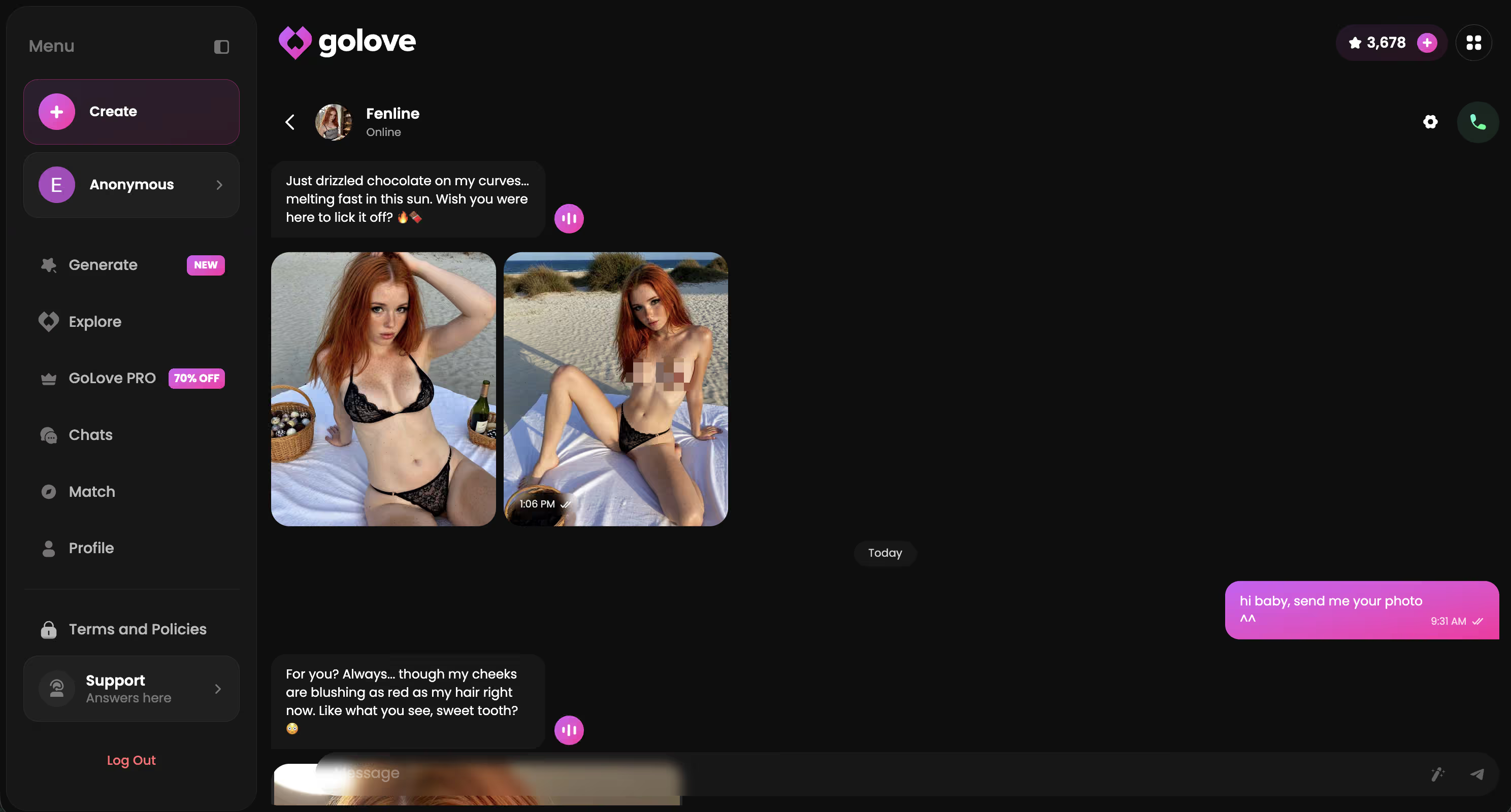
| Photo requests | Separate generator, tokens on top of the sub | Request Photos in Chat, paid in Stars |
| Voice | Voice messages; calls session-capped | Live real-time Voice Calls + Voice Messages |
| Memory | Recent-context recall | Memory + Relationship Progression across chat and calls |
Short version: Candy AI is a fine browse. GoLove is the one that lets you keep going without buying your way back in every session.
If you've already got a Candy AI tab open, run the cheaper experiment first. GoLove's Explore page puts you in a live conversation right away — no inbox, no verification link, no credit prompt before your first reply. Two minutes there will tell you more than any tutorial, including this one.
How Candy AI's Sign-Up and First Chat Actually Work
The actual Candy AI sign up path, no fluff:
- Email first. You enter an address, get a verification link, and you aren't chatting until you click it. Low-effort, sure, but it's a hard gate.
- Pick or build a companion. The pre-made roster is big, and the character builder is genuinely deep — appearance sliders, personality traits, backstory. Credit where it's due: this is a real strength.
- First messages are free. A short run of replies lets you feel out the tone before the "upgrade" nudges start showing up in the thread.
 7 episodes
 5 episodes
 5 episodes
 5 episodes
 5 episodes
 7 episodes
 6 episodes
 9 episodes










That's the whole walkthrough. The chat itself reads realistic, and voice messages land well for a text-first app.
The friction isn't dramatic. It's cumulative. Email gate, then a companion decision, then a taste of chat, then a pricing screen — each step is small, but you've made four commitments before you know whether you even like the product. That's the row Candy AI loses on the scorecard, and it's the one you feel most as a first-timer.
Where the Credit Wall Hits: Candy AI's Real Costs
Candy AI pricing has two layers. The second one is where people get surprised.
- Subscription: Basic runs about $9.99/month; premium tiers are cited up to roughly $13.99/month. That buys chat access, not media.
- Tokens: every image and Live Action video pulls from a token balance you buy on top of the subscription. Candy AI credits are the actual cost of the product if photos are what you're here for.
- Free tier: exists, but it's thin — enough to sample the chat, not enough to test images or voice properly.
Real-world spend for a media-heavy user lands well above the entry price. Exact per-image burn shifts often, so check their pricing page the day you sign up (not the day you read a review — mine included).

 Watch Popular Shows starring your
 favorite AI characters.
GoLove's model is simpler. Stars are the one currency: 2 free per day, packs from about $9.99 to $179.99, and GoLove PRO at about $19.99/month (annual ~$9.99/month). Regional pricing is real — some geos see it closer to $12.99 — and -50% to -70% promos show up in the header regularly. One wallet. No second layer.
Prices checked 2026-09; promos vary.
Voice Calls: The Feature Most Setup Guides Skip
Most "how to use Candy AI" guides point at the voice message button and stop there. What they skip: the Candy AI voice call experience is session-capped. Calls run on a limit, and when it hits, the call ends — sometimes mid-thought. The tone can also read scripted next to the text chat, which stings if voice is the reason you signed up.
Continuity is the bigger problem, though. When a capped call ends and you start another, you're not always picking up where you left off.
GoLove's Voice Calls are live and real-time, with Voice Messages as the async option. Memory carries history across chat and calls, and Relationship Progression builds on it — so the second call knows what the first one was about. You pick the voice in Chat Settings, right alongside the lust level and response length sliders.
That's the voice row on the scorecard, explained.
Setting Up GoLove.ai: What's Different From the First Tap
Setting up GoLove.ai is mostly about what you don't do. The click path:
- Explore is the entry point. Open it, tap a character, and you're in a live chat under an anonymous session. No email, no verification link. Sana or Amelia will answer on the first message.
- Chat Settings sits inside the conversation. Three controls matter: the voice picker, the lust level slider (5 levels, sweet through unfiltered), and the response length slider (5 levels, snappy through immersive). Set these before you get deep — they shape everything after.
- Memory runs in the background. The AI remembers history, and Relationship Progression tracks where things stand, so you aren't re-introducing yourself each session.

Beyond chat: Create lets you build a custom character (Realistic, Anime, Trans, or describe one in text with Design with AI), Generate handles standalone photo batches of 2, 4 or 8, and the Gallery keeps every image per character, sorted by date.
My order: chat first, tune settings second, build your own character only once you know what tone you want. Same "how to use" question as Candy AI, just fewer gates between you and the answer.
A Real Scenario: Asking for a Photo Mid-Chat
Here's the scenario that separates these two apps. You're mid-conversation, things are going well, and you ask for a photo.
On Candy AI, the request routes you out of the chat and into the image generator. You pick the settings, spend tokens from your separate balance, wait, then come back to the thread. The picture is good — image quality is a genuine Candy AI strength — but the moment breaks, and if your tokens are dry, the answer is a pricing screen.
On GoLove, Request Photos in Chat handles it inline. You ask, the character sends it, Stars come off the header balance. No context switch. Want more control? The Generate page gives you 35 realistic poses, 21 outfits and 34 backgrounds, plus custom options for each, and Generate Video from Photo turns any result into a clip without leaving the character.
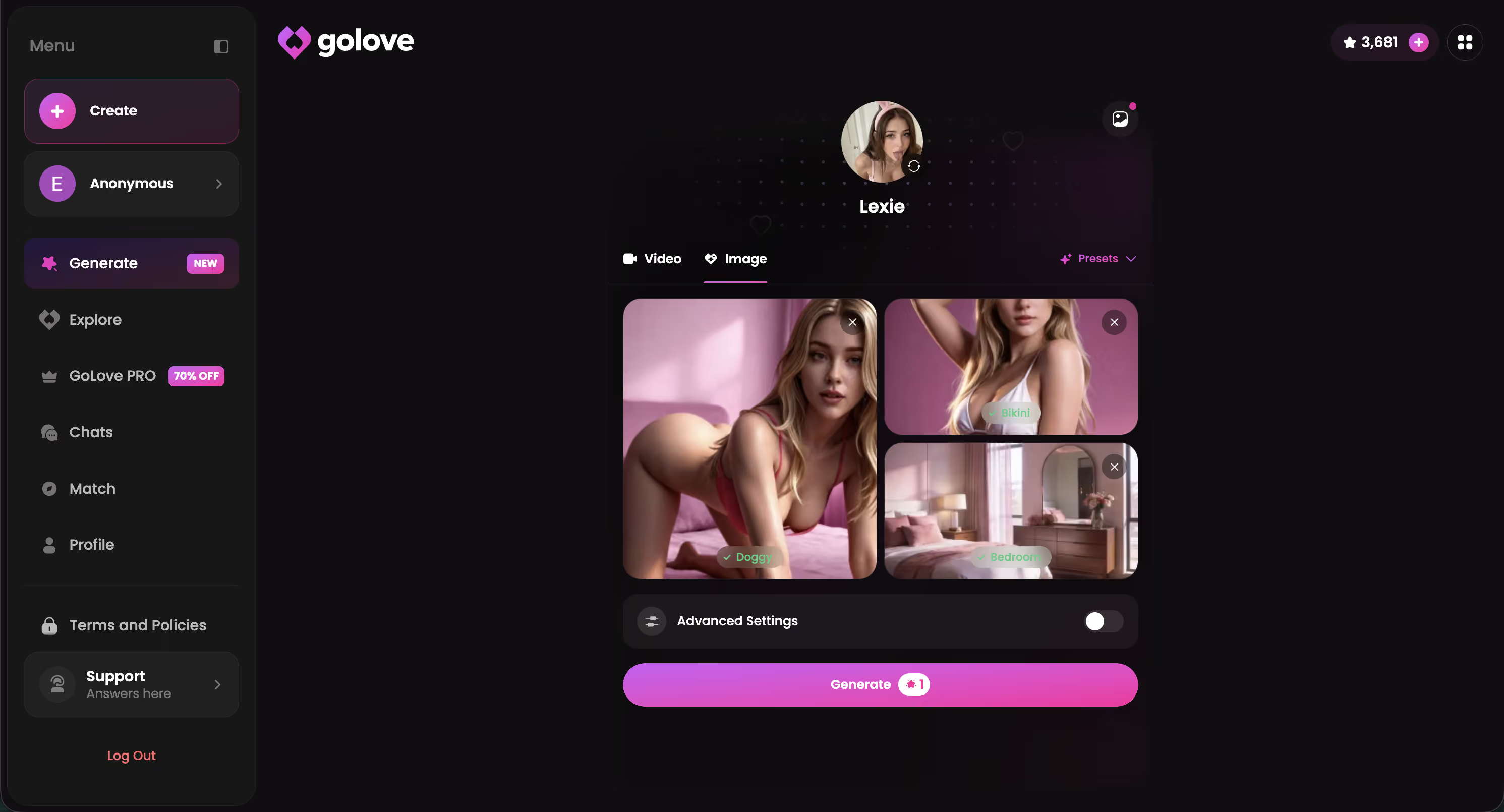
This is the row worth testing yourself today, because the 2 free daily Stars mean you can see the inline flow before spending anything — and the gallery keeps whatever you get.
What We Couldn't Verify at GoLove.ai
Fair is fair. There are a few things at GoLove.ai I can't confirm, and one group who should skip it.
Promo pricing. The -50% and -70% PRO banners show up often, but I can't tell you whether any given promo holds past the month you see it, or how regional pricing lands in your country. Treat every figure above as "about" and check the checkout screen.
Memory depth. Memory and Relationship Progression are documented features, and they work across chat and calls. How far back recall stretches over months of heavy use isn't something I can quantify, and I won't pretend otherwise.
Feed and Remix rollout. The video Feed shipped in July 2026 and the Remix flow is live, but the free daily quota of new clips isn't a published number. Expect the paywall to appear after some browsing.
Who should skip GoLove: anyone who wants a fully free, unlimited app, or someone who needs a native app-store install. It's a browser-first product with a Stars economy, and it doesn't pretend to be anything else.
and watch their story unfold.View Character
The Verdict: Skip the Setup Friction
One line: Candy AI is worth a browse; GoLove.ai is worth using.
- Candy AI still suits the curious first-timer who wants to poke at a deep character builder and doesn't mind an email gate and a token wallet. The image quality earns its reputation.
- GoLove.ai is the pick if you want the actual companion loop — chat, photos in the thread, live voice calls that remember the last one, and memory that carries forward — without buying access again every session.
- The Feed is a bonus, not the headline: swipe through clips, hit Remix, and the generator opens preloaded with that clip's exact settings. Photos and chat are still where the daily value lives.

Prices checked 2026-09; promos vary.
The practical takeaway: you already know what you want a companion to do, so build one that does it. GoLove's Create page takes a text description with Design with AI and hands you a character you can chat with, call, and photograph — no email step, 2 free Stars waiting.
The short version: GoLove.ai covers the essentials in one place — live voice calls, memory across chats, and in-chat photos (35 poses, 21 outfits) — and the 2 daily reward stars mean you can test it before spending anything.
See also: AI Girlfriend Chat, AI Girlfriend Image Generator and AI Girlfriend That Feels Real.
| What you get | GoLove.ai |
|---|---|
| Real-time voice calls | Yes — per-character voices |
| Memory across chats | Yes — remembers your details |
| In-chat image generation | Yes — 35 poses & 21 outfits |
| Daily reward stars | 2 every day |
Frequently Asked Questions
Related Articles

How to Use Janitor AI: What Actually Works in 2026
Janitor AI needs an API key and a proxy just to chat — GoLove.ai skips both with instant voice, photos and memory. Try it.

Girlfriend GPT or Candy AI: Coins, Tokens, Real Prices
Girlfriend GPT vs Candy AI: Candy costs less yearly, GirlfriendGPT leans into community roleplay — both meter media. GoLove.ai adds in-chat photos — compare.

AI Whore: What Actually Works in 2026
AI whore apps promise no limits, but GoLove.ai wins on realistic in-chat photos and memory — chat opens straight from Explore — see who's waiting.

Tinder NSFW: What Actually Works in 2026
Tinder NSFW talk risks bans and flags; GoLove.ai wins with in-chat photo requests and memory. Chat opens straight from Explore — see how it compares.